

Ready to take your restaurant to the next level? Register now and
start usingFooodis.com's advanced digital tools for free. Streamline
your operations, enhance customer service, and boost your profits with
our easy-to-use platform. Get started today for free and transform
your restaurant's future!
To start managing your restaurant's financials, navigate to the
Expenses section on the Fooodis dashboard. This section is where you
will oversee all of your restaurant's expenses, organized by
categories and vendors. In this hub, you can add new expenses,
categorize them, and manage suppliers. The Expenses Management
dashboard provides a streamlined view of all your transactions, making
it easy to monitor and control your financial outflows. Whether you're
viewing current expenses or setting up new categories, this section
keeps your finances organized and accessible.
Accessing and Managing the Expenses Section
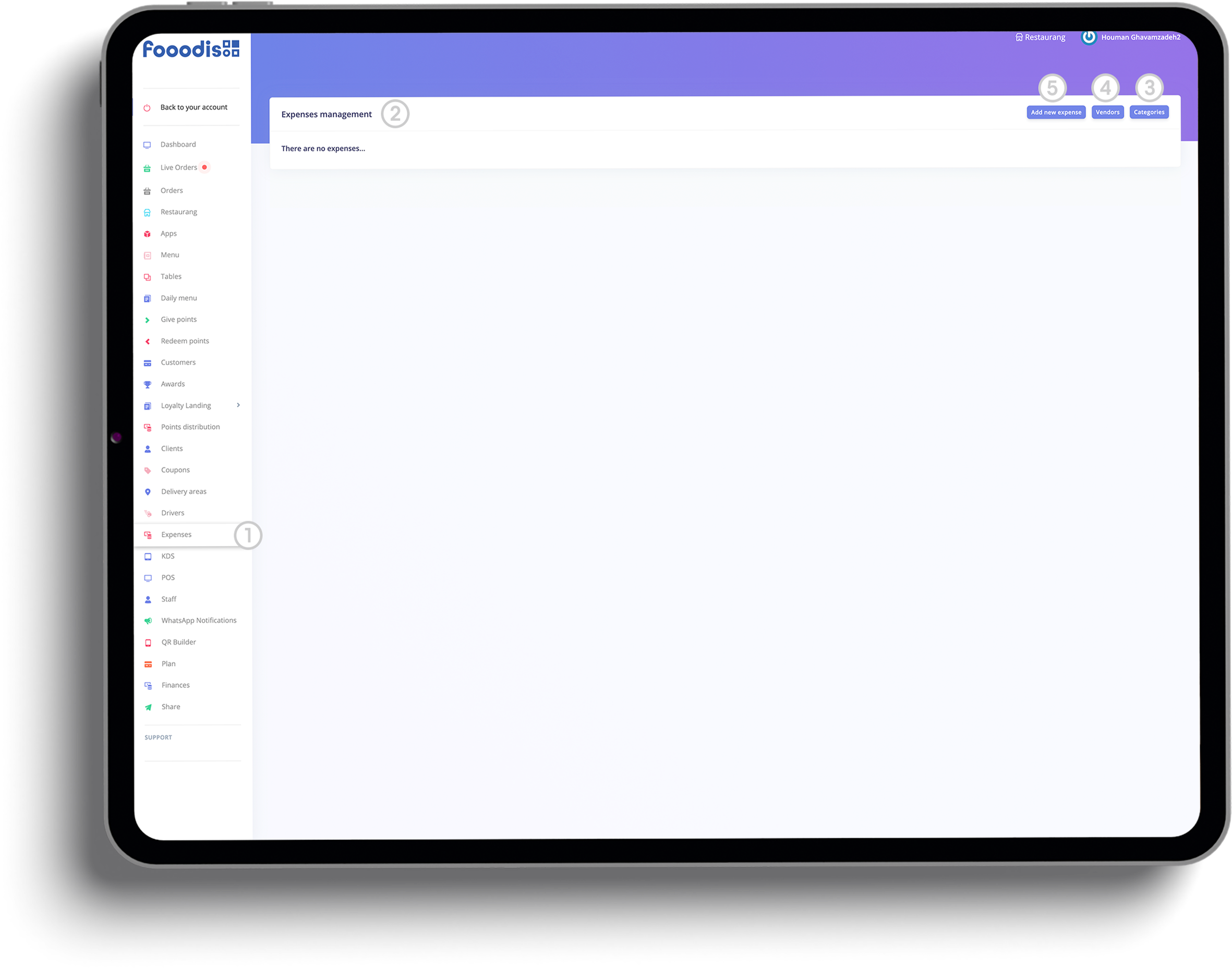
1. Access the Expenses Section
○ Start by navigating to the Expenses section in the
left-hand sidebar. This is where you can manage all of your
restaurant's expenses, vendors, and categories.
2. Expense Management Dashboard
○ Once inside the Expenses Management section, you'll see an
overview of all registered expenses.
3. Managing Expense Categories
○ To manage categories that classify your expenses, click on the
Categories button on the top right of the Expenses Management
page.
4. Managing Vendors
○ To view or manage vendors, click the Vendors button on the
main expense screen.
5. Adding a New Expense
○ To log a new expense, click the Add New Expense button at
the top of the screen.
Accurate categorization is key to effective financial tracking. In the
Expense Categories Management
section, you can create and edit categories to classify your
expenses—whether for "Suppliers," "Utilities," or other costs.
Similarly, the
Vendors Management section
allows you to keep track of all your suppliers, ensuring each expense
is linked to the correct vendor. By adding, editing, or deleting
categories and vendors, you create a structured framework that makes
expense tracking easier, more transparent, and better organized for
reporting.
Managing Expense Categories and Vendors
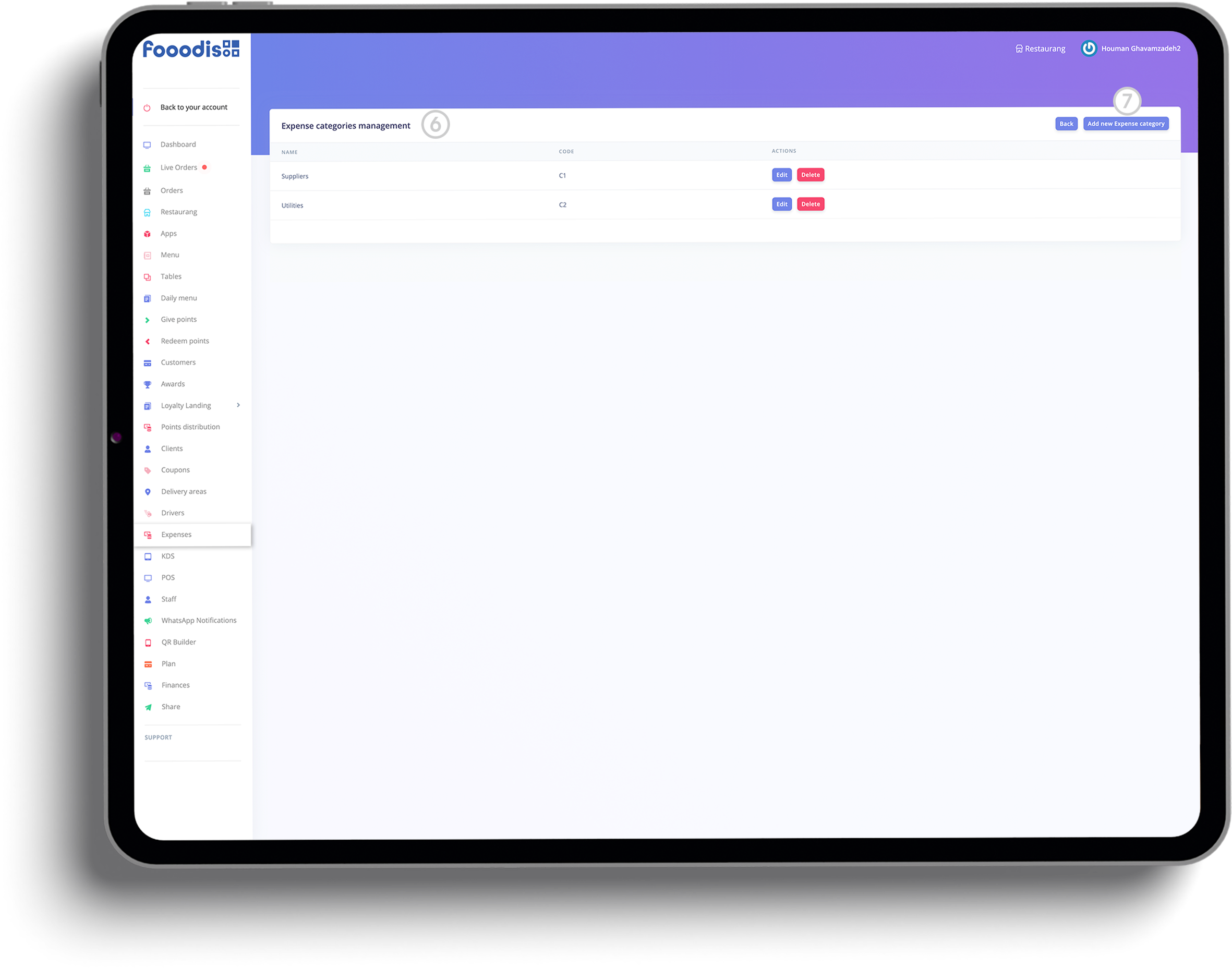
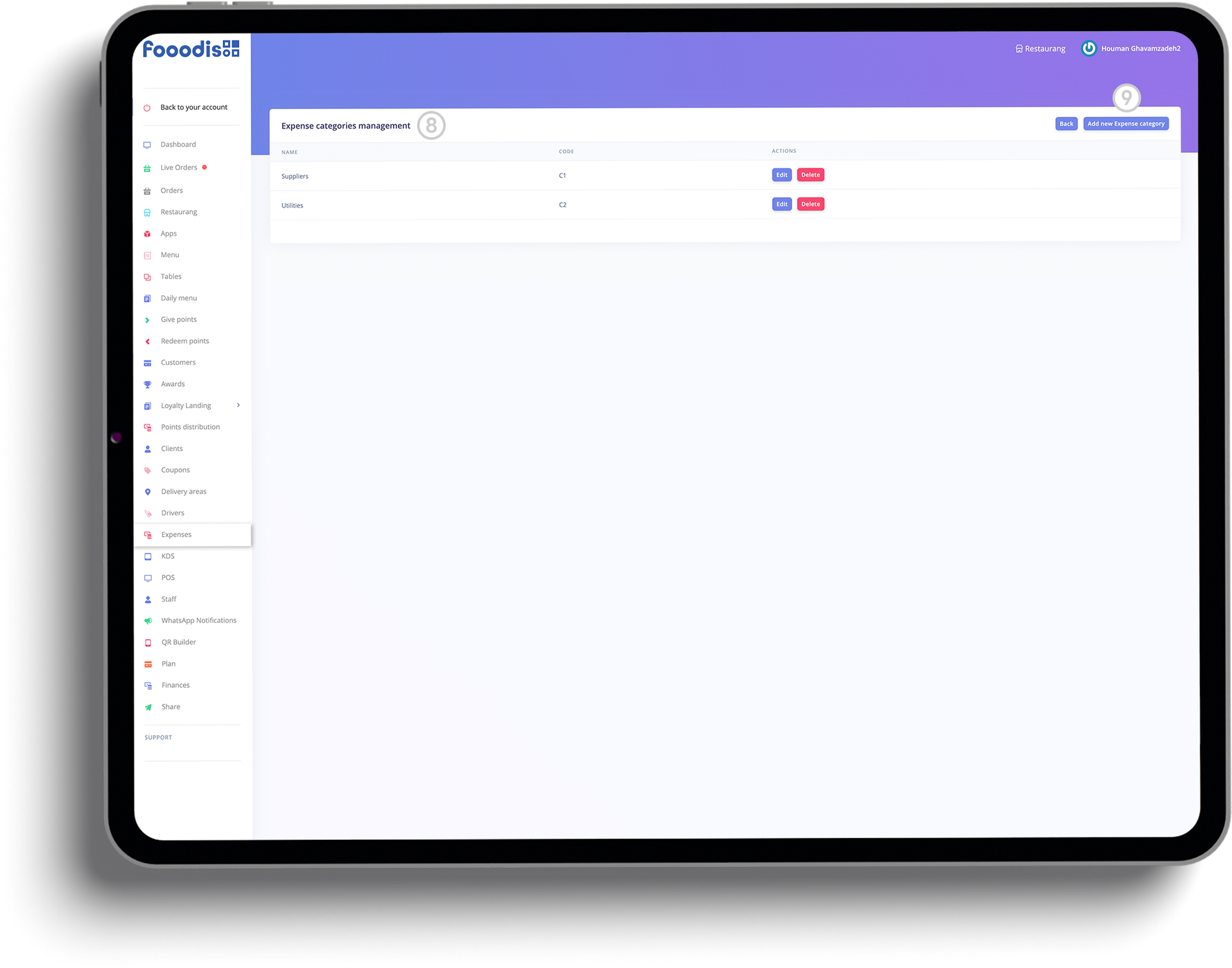
6. Expense Categories Management
○ In the Expense Categories Management screen, you will see a
list of all defined expense categories.
7. Adding a New Expense Category
○ To add a new expense category, click
Add New Expense Category and fill in the required fields.
8. Editing or Deleting Expense Categories
○ You have the option to Edit or Delete existing
categories to keep them up to date.
9. Adding New Vendors
○ After setting up your categories, you can manage vendors by
clicking Add New Vendor in the
Vendors Management section.
In order to accurately track where your money is going, you need to
categorize your expenses and assign them to the right vendors. The
Add New Vendor and
Add New Expense Category
options allow you to input detailed information about your suppliers
and expense types, giving you control over how your financial records
are organized. Once saved, these vendors and categories can be
selected during the expense logging process, ensuring that each
transaction is properly classified and traceable.
Adding and Managing Expenses
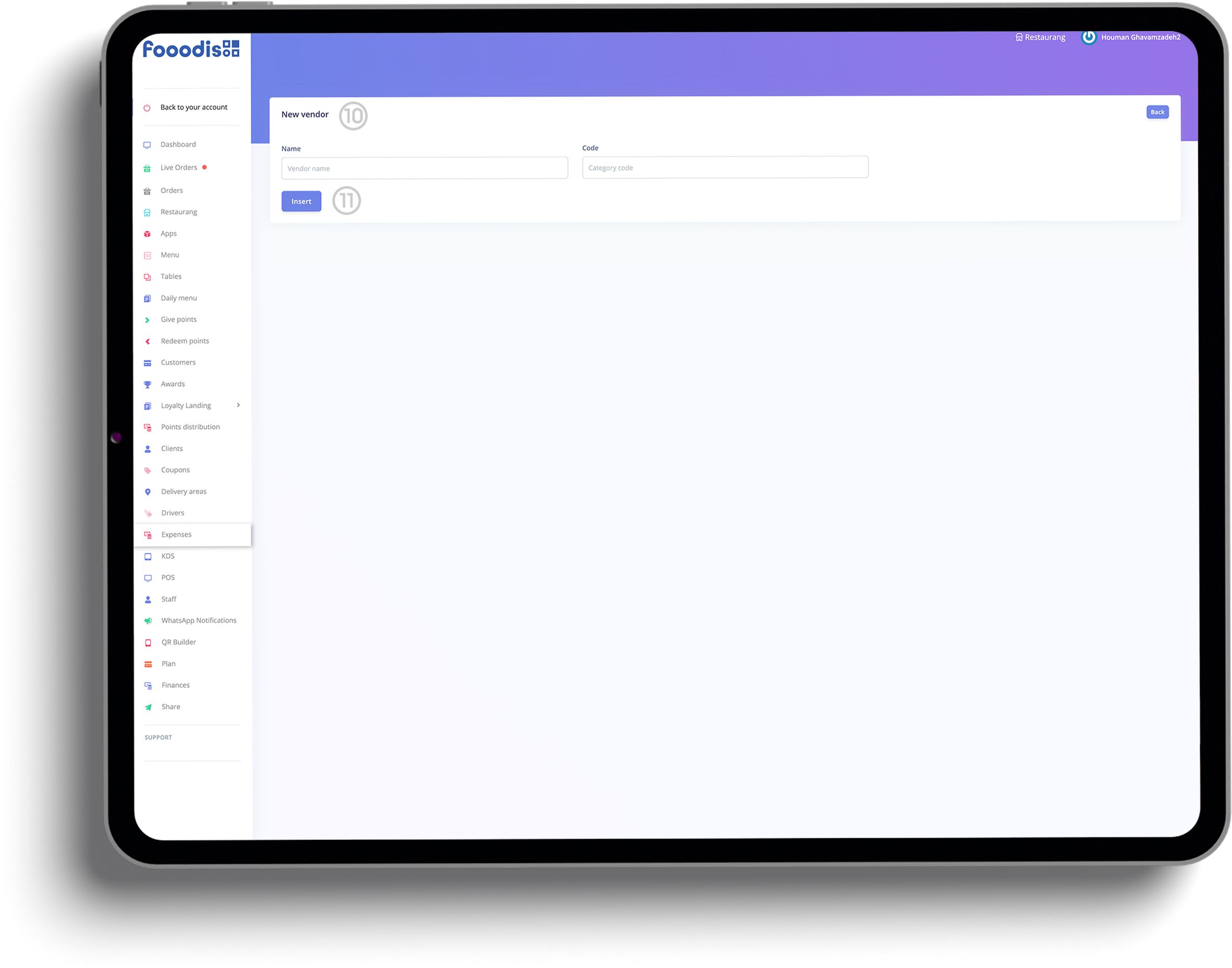
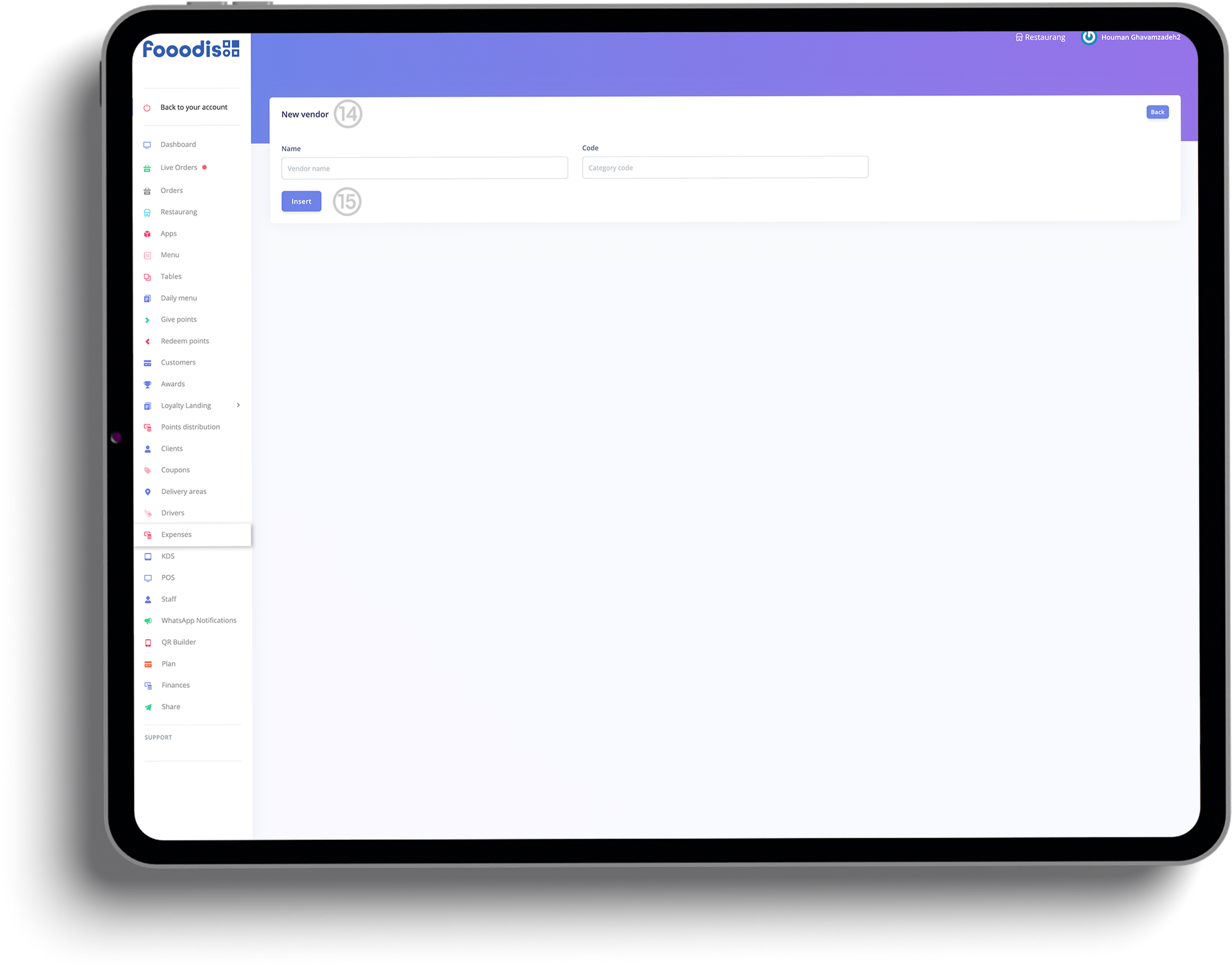
10. Adding a New Vendor
○ When adding a new vendor, fill out the required details such as
Vendor Name and Category Code to ensure the vendor is
correctly linked to its respective category.
11. Saving a New Vendor
○ After filling in the necessary details for a vendor, click
Insert to save the vendor to your list.
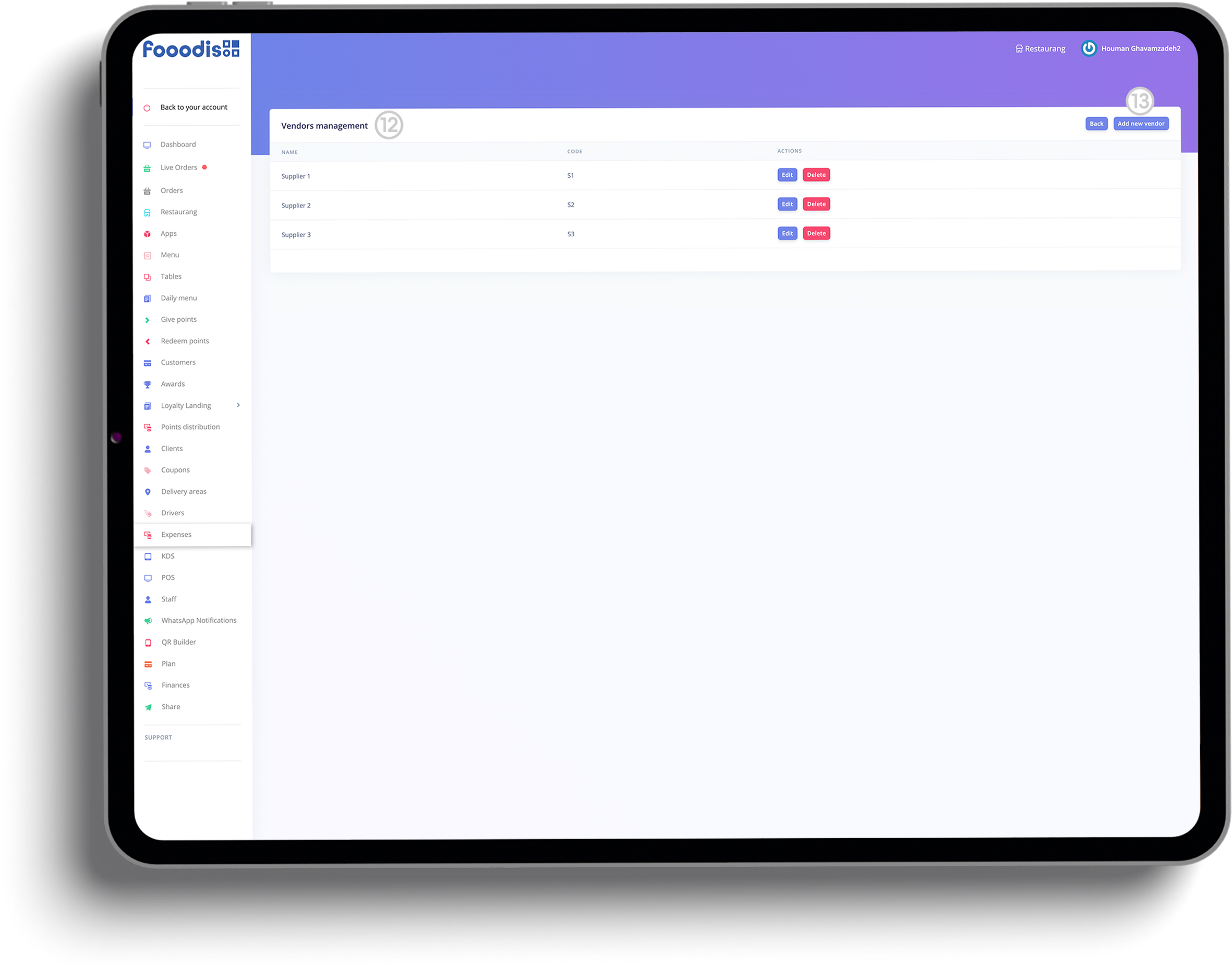
12. Viewing Vendors in Vendors Management
○ In the Vendors Management screen, you will see all added
vendors. From here, you can manage vendors by editing or deleting
them as needed.
13. Managing Vendors Actions
○ In the Vendors Management list, you can either
Edit or Delete vendors using the corresponding buttons
next to each vendor's name.
Logging a new expense is simple and efficient with the New Expense
section. Here, you can input important details such as the date,
amount, vendor, and category for each transaction. This ensures that
all of your expenses are properly organized and assigned, allowing for
better financial oversight. Once logged, these expenses appear in your
main Expense Management dashboard, where they can be reviewed, edited,
or deleted as needed. With clear and organized data, you can analyze
your spending and make informed financial decisions to optimize your
restaurant's performance.
Logging New Expenses
14. Adding a New Expense Category
○ When creating a new expense, you can select a category for the
expense from the available categories listed.
15. Adding Vendors for an Expense
○ To link a vendor to an expense, simply select the vendor from the
dropdown menu when creating a new expense.
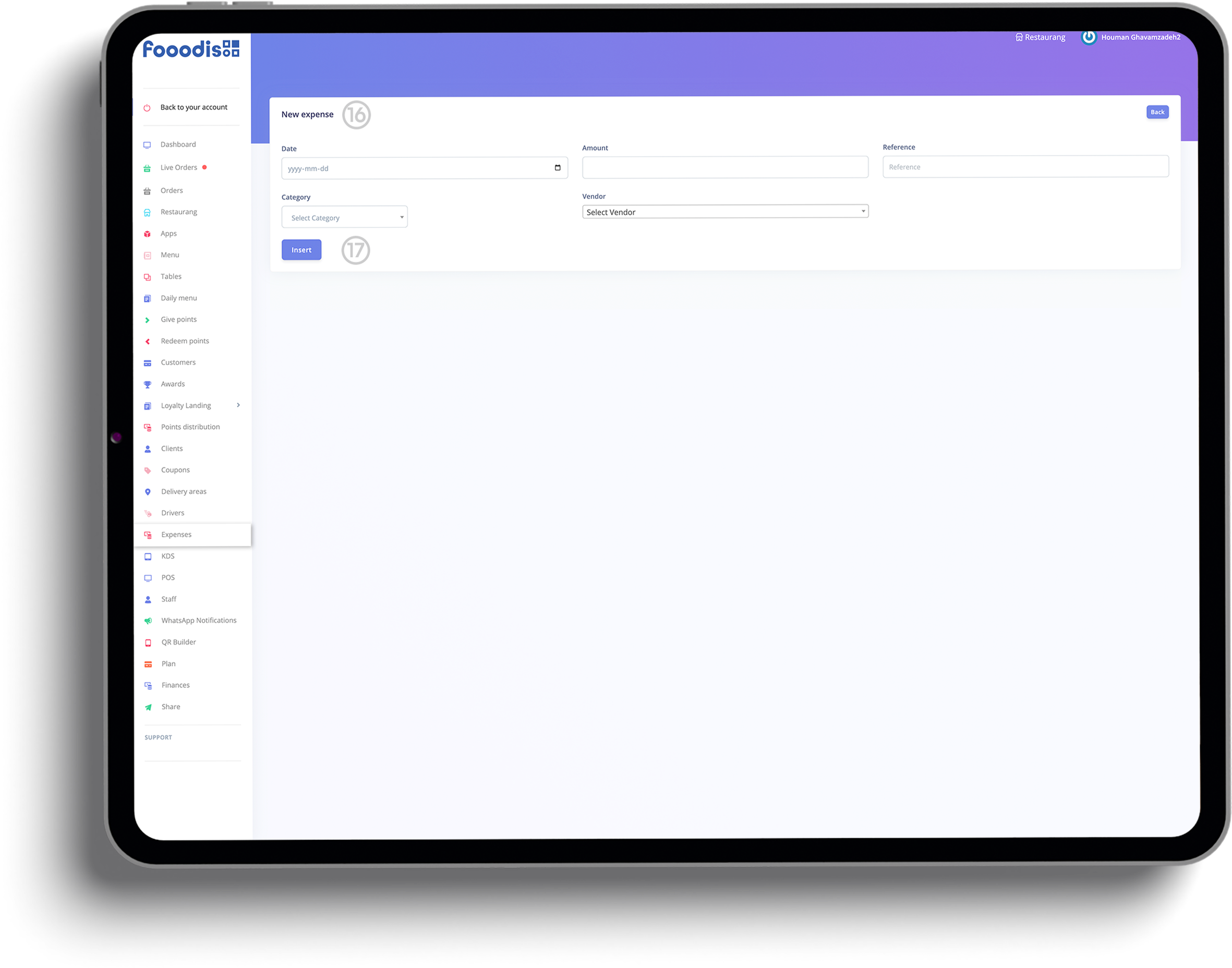
16. New Expense Entry
○ On the New Expense screen, input the necessary details such
as Date, Amount, Reference, Category,
and Vendor.
17. Saving a New Expense
○ Once you've entered all the relevant information for the expense,
click Insert to save it.
Why Expense Management is Crucial
Tracking and managing your restaurant's expenses is key to
maintaining profitability. By using categories and vendors to
organize expenses, Fooodis makes it easy to analyze spending
patterns and ensure your financial records are accurate.
Dive into our fully functional demo website and explore the power and
simplicity of the Fooodis POS system. Test all the features, customize
your experience, and see firsthand how our integrated platform can
transform your restaurant management. Click here to start your
journey!

Discover the power of unified social media campaigns, custom content design, and creative digital storytelling at Logo Land Design. Our expert team specializes in designing, executing, and monitoring digital ad campaigns for maximum ROI. We craft a unique brand voice and strategy, create dynamic animations, produce compelling video narratives, capture stunning photography, and generate engaging, plagiarism-free content. Elevate your brand's presence with our tailored digital solutions.
Your journey with Logo Land Design doesn't end here. Explore our additional offerings by visiting the dedicated websites for our specialized products: the Website Builder, Email Marketing Program, and Webshop Builder. Each one is designed to enhance your digital experience and success. Discover more now!
Managing expenses is a crucial part of running a successful
restaurant, and Fooodis makes it easy with its comprehensive expense
management tools. Below are some frequently asked questions to help
you understand how to use the expense management features and keep
your financials organized.