Ready to take your restaurant to the next level? Register now and start usingFooodis.com’s advanced digital tools for free. Streamline your operations, enhance customer service, and boost your profits with our easy-to-use platform. Get started today for free and transform your restaurant's future!
Keep Customers Informed with Personalized Status Updates
The Send Status Templates feature allows you to create and manage custom messages that keep your customers updated on their orders. Whether you're notifying them that their food is being prepared or that it's on the way, these templates can be tailored to match your restaurant's tone and style. Simply select the template, edit the message, and save your changes. With clear and timely communication, you’ll enhance customer satisfaction and streamline the order process.
Guide to the Fooodis Dashboard Section
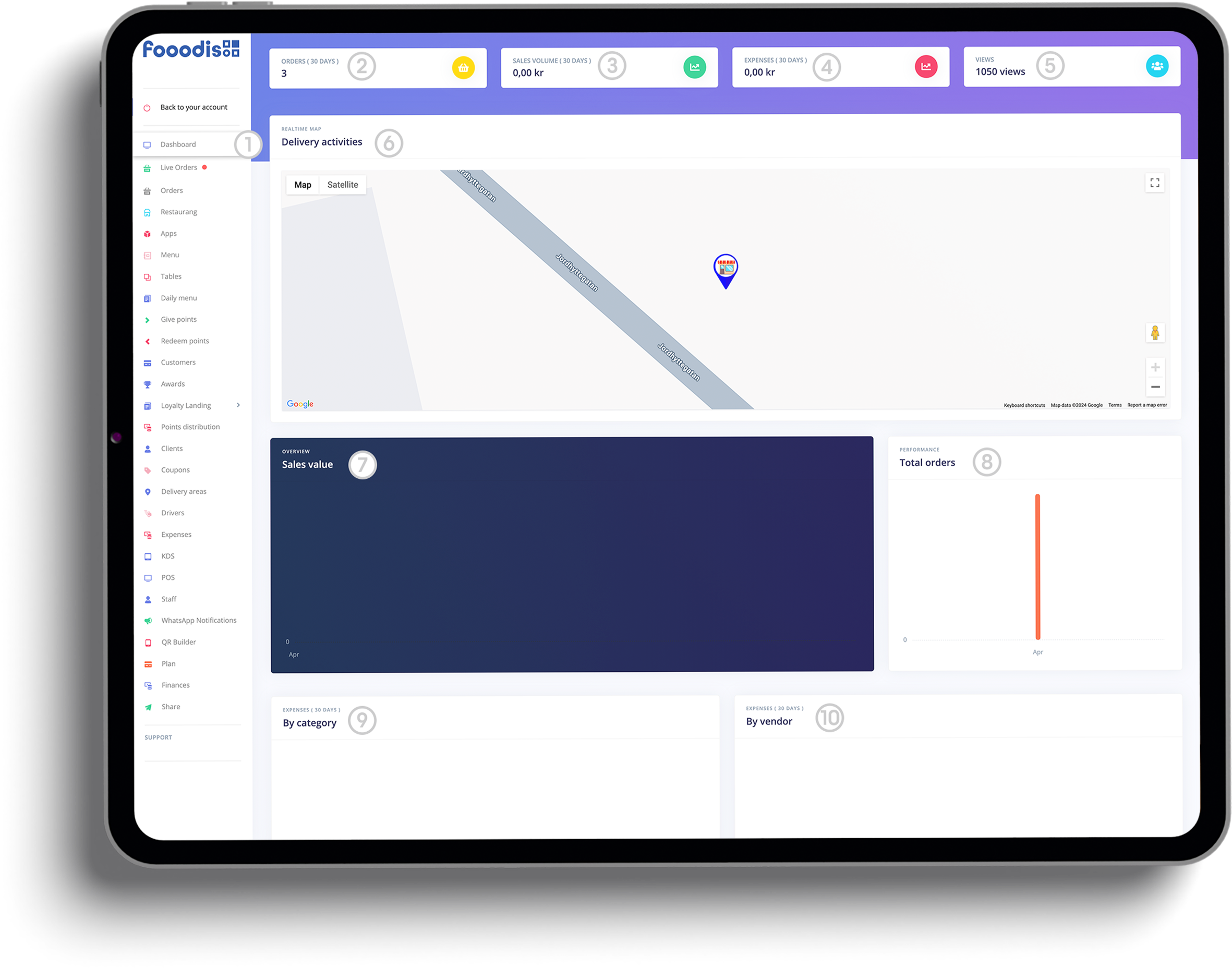
1. Dashboard Section Overview ○ The dashboard is accessible from the left-hand sidebar under the Dashboard tab. It provides a comprehensive view of your restaurant's performance metrics and activities.
2. Orders (30 Days) ○ This section shows the total number of orders your restaurant has received in the last 30 days, helping you understand recent sales trends and customer activity.
3. Sales Volume (30 Days) ○ This field displays the total sales revenue generated in the past 30 days. It gives you a quick glance at how much your restaurant has earned within the specified period.
4. Expenses (30 Days) ○ Here, you can track your restaurant’s expenses over the last 30 days. This data helps you manage costs and optimize profit margins.
5. Views ○ This section shows the number of views your restaurant’s online menu or ordering platform has received, giving you an idea of your visibility to potential customers.
6. Delivery Activities ○ The Delivery Activities map visualizes your delivery operations. It displays real-time delivery tracking, helping you monitor driver locations and delivery statuses.
7. Sales Value ○ The Sales Value chart provides an overview of your sales performance over time. You can analyze sales trends across specific dates or months to measure growth and adjust strategies.
8. Total Orders ○ This performance chart shows the number of total orders placed within the selected period, allowing you to monitor how busy your restaurant has been over time.
9. Expenses by Category (30 Days) ○ This section breaks down your restaurant’s expenses into various categories, such as food costs, labor, or supplies. It helps you identify which areas require better cost management.
10. Expenses by Vendor (30 Days) ○ The Expenses by Vendor chart highlights which vendors or suppliers contribute to your restaurant’s expenses. This feature assists in evaluating supplier costs and adjusting orders accordingly.
Dive into our fully functional demo website and explore the power and simplicity of the Fooodis POS system. Test all the features, customize your experience, and see firsthand how our integrated platform can transform your restaurant management. Click here to start your journey!
Logo Land Design - Your Gateway to Digital Excellence
Discover the power of unified social media campaigns, custom content design, and creative digital storytelling at Logo Land Design. Our expert team specializes in designing, executing, and monitoring digital ad campaigns for maximum ROI. We craft a unique brand voice and strategy, create dynamic animations, produce compelling video narratives, capture stunning photography, and generate engaging, plagiarism-free content. Elevate your brand's presence with our tailored digital solutions.
Unified Social Media
Designing, executing, and monitoring digital ad campaigns for maximum ROI
Your journey with Logo Land Design doesn't end here. Explore our additional offerings by visiting the dedicated websites for our specialized products: the Website Builder, Email Marketing Program, and Webshop Builder. Each one is designed to enhance your digital experience and success. Discover more now!
The Fooodis Dashboard is a powerful tool that provides a centralized view of your restaurant’s key performance metrics. Whether you’re tracking orders, monitoring sales, or managing expenses, the dashboard gives you all the data you need to optimize operations. Below are some frequently asked questions to help you better understand and utilize the dashboard’s features.
The Fooodis Dashboard is designed to give restaurant owners a complete overview of their business performance, including sales, orders, expenses, and delivery activities, all in one place.
The dashboard displays Sales Volume (30 Days) and a Sales Value chart, which provide a detailed look at how much revenue your restaurant has generated and sales trends over time.
The Orders (30 Days) section shows the total number of orders placed within the past 30 days, allowing you to easily track customer activity and sales volume.
The dashboard includes both Expenses (30 Days), which shows your overall costs, and Expenses by Category/Vendor, which provides a breakdown of expenses by supplier or category (e.g., food, labor, supplies).
The Views section displays how many times your restaurant’s online menu or ordering platform has been viewed, giving you insights into customer interest and online traffic.
The Total Orders graph gives you a visual representation of how many orders were placed over time, allowing you to spot trends, busy periods, and growth patterns.
By reviewing metrics such as sales trends, expenses by category, and delivery performance, you can make informed decisions about staffing, inventory management, menu pricing, and more.